Production services and interactive demonstrations
Winnitude separates real account/business services from public interactive demonstrations. A demo is for exploring the application; it must not silently become a way to edit somebody’s production account, HR records or software licenses.
The default provider is winnitude.ca, with PlatinumAuth and PlatinumSHL supplied as part of the accepted service deployment. The following are the production/demo release mounts. Rollout and acceptance are being completed before this manual publishes; the publication ledger records their current state:
| Application | Production | Interactive demonstration |
|---|---|---|
| PlatinumAuth | auth_s | auth_d |
| PlatinumHR | hr_s | hr_d |
| Software Licensing Hub | shl_s | shl_d |
Recognize the mode
Production uses the actual server authority, real records and configured identity, recovery, licensing and delivery providers. Signing in and server authorization determine what you can do. An upgrade must preserve ownership and records; it must not seed production with ACME test users or permissive fixture permissions.
Every demonstration should visibly say ACME Corporation / Your Business Here — Interactive Demo. It uses generated records and the real application UI. Simulated sign-in, email, payment, provisioning or signing results must be labelled. A demo persona is not a Winnitude account or a software entitlement.
The trusted deployment/build configuration selects the mode. Changing a URL query flag, a local role or a frontend setting cannot turn a demo into production or grant production writes. _d artifacts must contain no production private keys, payment credentials, recovery secrets or personal HR data. Server-side denial matters even if the UI has no Save button.
Work in the demonstration
Demo editing creates local overrides of an immutable generated baseline. That includes additions and deletion/tombstone records; the original seed stays unchanged. A local demo save is not an authoritative server receipt. Reloading or using in-app navigation/Back/Forward should retain the bounded overlay for its current compatible demo session.
The release policy's default inactivity timeout is 30 minutes of actual inactivity, visible to the visitor and configurable by the deployment. Background asset warming does not keep a session alive. Expiry or an incompatible baseline/schema resets safely to the seed. Reset Demo is available only in demonstration mode: it clears that application's overlay, drafts and navigation, and notifies its other tabs through a new demo generation. It cannot reset production or another application's data.
If browser storage is denied, full or corrupt, the app must explain its temporary in-memory fallback. Closing/reloading can then lose changes. Storage failure must never redirect writes to production. Production credentials, recovery codes and private caches must not enter demo storage.
Fast loading without surprise activity
Winnitude information pages may prefetch the public immutable assets for Auth/HR/Hub demos and the playable Game Creator demo. Scheduling should be bounded, idle/visibility-aware and prioritize the likely next demo. Versioned content hashes and the ordinary browser cache avoid redundant downloads.
Prefetch must honor an explicit offline choice, browser data-saving signals and cache limits. It must not sign you in, create sessions, fetch private services, send telemetry or start a game merely because you read an information page. Optional warming must not delay the page's important foreground assets. Cache warming is not evidence of “instant” first load; cold/warm download and usable-screen times need measurement.
Configuration and security boundary
Keep cookies/session caches scoped to the reviewed application path and issuer/audience. A demo route/persona must never authenticate a production API call. Runtime/module caches and account/data caches have different ownership. Real logout, revocation and account switching must still be checked after browser history/BFCache restoration.
Deployment examples are documentation data describing the six intended mount/mode combinations. They are not a substitute for a Runtime's signed build/deployment receipt, actual secrets/provider configuration or a published executable configuration schema. Operators should map them into the released host's real trusted configuration. No production secrets appear in the examples.
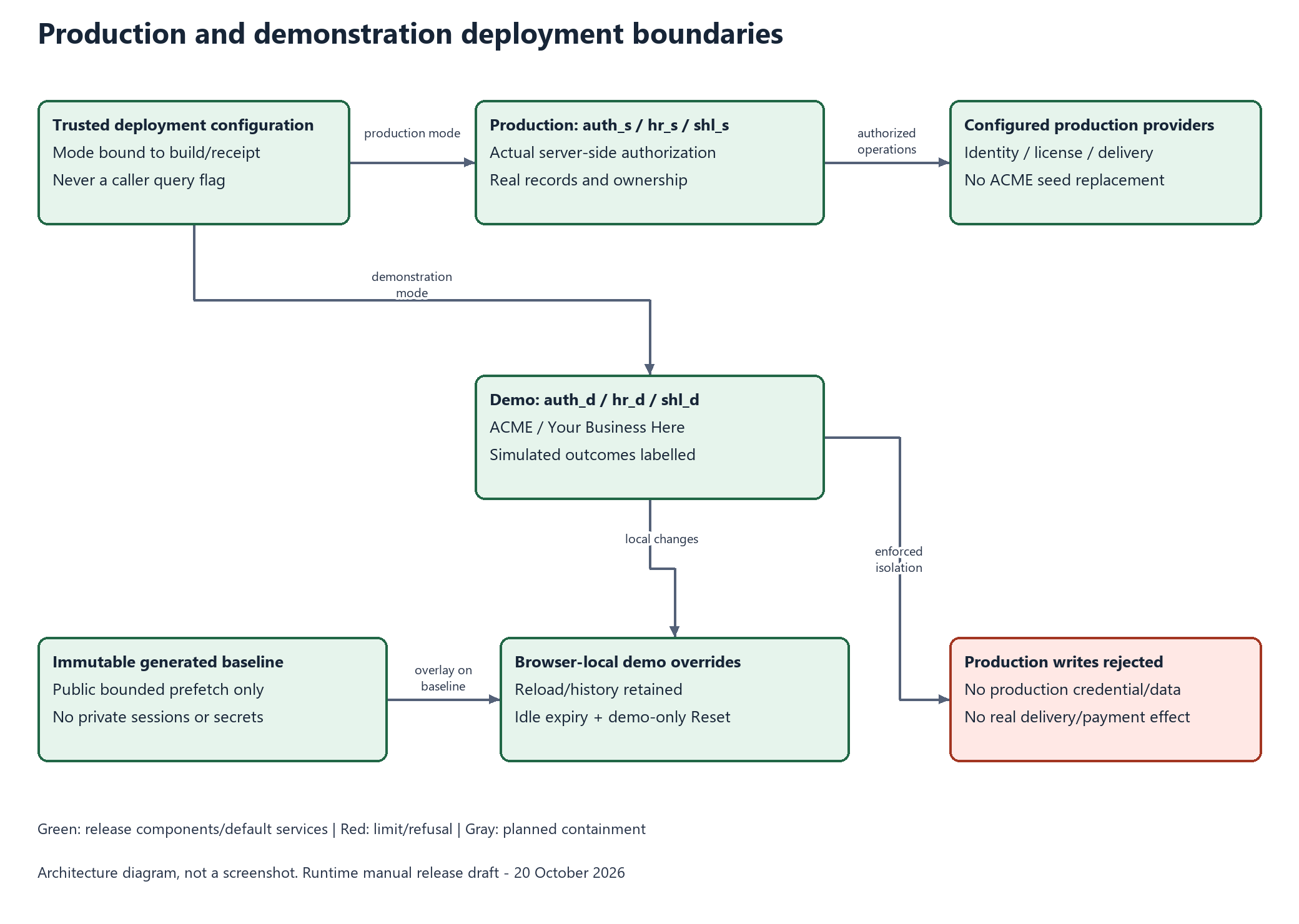
The diagram is an architecture illustration. SVG export and canonical source are available. Final acceptance must separately verify production and demo artifacts, rejected demo server writes, unchanged seeds, reload/history persistence, multi-tab reset, timeout/quota/corruption, app/mode isolation, no production credential leakage and no email/payment/license side effects.
Status of this manuscript
The production/demo rules are the coordinator's DEP01–08 release requirements. This documentation branch records and illustrates them; it does not implement the shared deployment overlay service, application-specific server enforcement, public-page prefetch, rollout or the six hosted deployments. Those are the assigned SDK/app/website/coordinator lanes, with deployments underway and acceptance required before publication. The release diagrams show these supplied default services in green; they do not claim every current development snapshot already passed. See and .